Thursday, January 8, 2015

SpeechWare TravelMike - Physicians Review

SpeechWare TravelMike - Physicians Review
After an initial rough start (defective TravelMike mini gooseneck microphone - a rare occurence; and Dragon User Profile set up issues - my fault), I am pleased to have the SpeechWare TravelMike doing extraordinarily well on its own User Profile in green mode. I am amazed at how well DMPE2/TravelMike does at learning pronounciation and new vocabulary; it usually needs only one correction to learn my pronounciation or new vocabulary. It seems to me to do better at many of the common troublesome words I have struggled with on several other sound systems such as "fibrillation, voltages, spironolactone, hypertrophy, cardiomyopathy, electrocardiographically, electocardiogram, echocardiogram, wander, etc.. In other words, it has been the fastest to train sound system I have ever used. Perhaps some of this is due to more experience on my part at training new words and phrases (or maybe Dragon training me).
I never thought it would be possible for a small speech recognition sound pod to rival or equal the accuracy of a much more expensive pro-audio system, but subjectively it is my experiece that the SpeechWare TravelMike has done it.
The smaller form factor makes it even easier to carry around than the Buddy 7G/audio-technica PRO 8HEmW when going from exam room to exam room. More comfortable and faster than a headset too. The TravelMike has become my new favorate for use in exam rooms. The addition of a pivoting 90 degree USB elbow connector would make it perfect.
I just recently placed an order for a SpeechWare FlexyMike single ear from Lunis. The design and specifications suggest this microphone will be fantastic for those times I will be beyond the useable distance of the TravelMike.
Happy dictating,
David
~~DMPE2 [BestMatch V, Large Vocabulary], KnowBrainer 2012 D, VoiceComputer 64-bit v12, Windows 7 Professional 64-bit. Lenovo T520 [i7-2620M, 8GB DDR3-1333, SSD]. Work & Home Office: Sound Devices USBPre 2; DPA d:fine omnidirectional, Audio-Technica BP892, Shure WH30XLR, Earthworks SR40V, Sennheiser MD431 II & ME65/K6P, Samson AirLine 77/QV10e. Exam rooms: SpeechWare TravelMike or Buddy 7G/Audio-Technica PRO8HEmW or FlexyMike SE

Tom Hamilton
Nuance Gold Certified & BBB Accredited
KnowBrainer Speech Recognition Forums http://www.knowbrainer.com/forums/forum
KnowBrainer.com http://www.knowbrainer.com
support@knowbrainer.com

SpeechMatic MultiAdapter

SpeechMatic MultiAdapter USB Soundcard Release / Review

SpeechMatic MultiAdapter USB Soundcard Release / Review
We have always endorsed the use of external USB soundcards or USB microphones. Now, the only USB soundcard we will be recommending is the SpeechMatic MultiAdapter (due August 22, 2013). The MultiAdapter not only includes auto gain control but additionally includes auto EQ, to compensate for vocal tonal changes that occur when speaking at lower or higher volume levels or extending or shortening the microphone distance. Besides being the only USB soundcard to include auto volume/EQ, it also features global broadband noise filtering, a de-clicking algorithm (to block non-words such as clearing your throat) and NaturallySpeaking 11/12 algorithms, all impregnated onto an integrated circuit board. This new USB soundcard, which we have been testing for the past 6 months, is introducing 6 new technologies which you’ll find covered in our KnowBrainer USB Soundcard Face-Off. The bottom line is that we found the new SpeechMatic MultiAdapter increased our speech recognition accuracy by approximately 1% over other soundcards. 1% may not sound like much until you realize that raising your accuracy from 96% to 97% translates to more than 25% fewer misrecognitions. To demonstrate this new technology, we were able to place our headset approximately 12 inches away on our desktop, and continue dictating. Although our accuracy dropped a bit, we know of few other headset microphones that could be used from 12 inches away.

Tom Hamilton
Nuance Gold Certified & BBB Accredited
KnowBrainer Speech Recognition Forums http://www.knowbrainer.com/forums/forum
KnowBrainer.com http://www.knowbrainer.com
support@knowbrainer.com

Speechware FleyMike - translators choice

Speech recognition for translators: microphone tips

Speech recognition for translators: microphone tips
Apr 15, 2014

Speech recognition for translators: microphone tips

Guest post by Jim Wardell
Mark Myworts is heavy into a major procrastination project, pawing through moldy old copies of Popular Mechanics in Grandpa’s basement, when a small classified ad in the back pages catches his eye. He blows off the dust:
“Translators! Double your income overnight with amazing new technology! Works wonders for English, German, Spanish, French, Italian, Dutch. No obligation. Call ... Full confidentiality guaranteed.”
[Fade in “Twilight Zone” theme music.]

 [Cut to Mark talking intently to his computer.] “... should be used instead of the diminutive terms ‘pud’ and ‘loser’” ...
 [Fade to Mark and kiddies.] “Well daddy, can we? can we? Can we go to the circus tonight?” “Sure kids, I’m knocking off early today,” says Mark nonchalantly, getting a kiss and one of those sexy “well-what-about-after-the circus” looks from his admiring wife.
 Science fiction? 1950s social mythology? Perhaps.
 But the simple fact remains – at least now in 2014 – that translators into English, German, Spanish, French, Italian and Dutch really can double their productivity on average using some amazing, although not quite so new technology: speech recognition.

***
 I’ve been using speech recognition to translate from German into English for nearly 20 years. But it was not until about seven or eight years ago that computing power and speech recognition software had improved to the point where serious productivity gains became possible. It was at that point that it became imperative for me to find a CAT tool that was totally compatible with Dragon NaturallySpeaking. At the time, only two products met this requirement: Déjà Vu and memoQ. For various reasons, which I won’t get into now, I decided to go with memoQ, a decision I have never once regretted.
 Most any CAT tool can be made to work with Dragon by using the little “Dictation Box” text buffer that’s provided as a workaround in Dragon for software that is not truly Dragon compliant. The procedure needed to translate average moderately sophisticated technical documents in noncompliant CAT tools can often be cumbersome and inefficient: one copies the contents of the current source segment text into the Dictation Box so any strings that do not need to be translated can be left as is or moved around as desired and so that sections of text that need to be translated can be overwritten by marking them and then dictating the new translation “over the top”. Once the source segment has been duly massaged in the Dictation Box, the contents of the box are then transferred to the target box in the noncompliant CAT tool. Of course, various tags and formatting that might have been present in the source segment are often lost when source text pasted into the Dictation Box. So they need to be put back in again after the contents of the Dictation Box have been pasted into the CAT target box. If this sounds gruesome, it is.
 So why not just dictate straight into the noncompliant target box and fix the messes as they occur? The answer is simple: there are often too many messes, and, worse still, any incorrect speech recognition that occurs cannot be corrected in a way that will ensure that correct and not erroneous data will be fed and saved in the Dragon speech recognition engine. Over time, this would degrade speech recognition accuracy! I spent some years trying to address this issue with publishers of CAT tools other than memoQ and Déjà Vu ... with zero success. So if you’re not already using Dragon and want to use it with a CAT tool, make sure that the CAT tool that you are thinking of using is really fully compatible with Dragon and that you can get your money back if it’s not. Do not trust and do verify.[1]
 At one point before I switched memoQ, I was compelled to do a good bit of this acrobatics moving text into an out of the Dragon Dictation Box. I began to have the feeling that the cutting edge that I was working on in a number of well-known CAT tools was so dull that I might just as well have been typing in my translation in the old-fashioned way. So I collected some statistics discovered that that was indeed the case. My output was the same in noncompliant CAT tools and Dragon as with touch typing without Dragon.
All that changed with the memoQ’s full Dragon compatibility! Incidentally, memoQ has full Dragon compatibility throughout the interface and not just in the translation grid. So if you want to dictate notes or definitions in term base entries, you can, and you can still use all of the selection and correction features you are accustomed to using in Dragon. Want to write a longish note to a client in a memoQ Comment box? No problem. Dictate away.

* * *
 Anyone who has dealt with integrated technologies, any process in fact, knows that the old saying “A chain is only as strong as its weakest link” is totally true. So to get really great speech recognition results, not only does one’s CAT tool have to be compatible and outstandingly good, one’s computer needs to be sufficiently powerful, and one needs to use the best available microphones. I heartily recommend KnowBrainer.com as a source of top quality microphones for speech recognition. To my knowledge, KnowBrainer is the expert in the USA, probably the world, when it comes to speech recognition products. People who want to achieve maximum accuracy with speech recognition software should make their first stop KnowBrainer’s Microphone Comparison page.[2] For many years, I used KnowBrainer’s top-rated Samson Airline 77 microphone. This microphone was vastly superior to anything I had ever used in the past and came delightfully close to delivering 100% speech recognition accuracy. Earlier this year, however, I learned that the wireless channel used in my old Airline 77, which I bought while I was still located in the United States, was being shifted to use by mobile phones in Europe and would no longer be legal. So I checked out KnowBrainer again, and learned about a relatively new microphone being produced specifically for speech recognition by a Belgian company: SpeechWare. Upon consulting with KnowBrainer’s Lunis Orcutt (Mr. Speech Recognition in my book!), I ordered the SpeechWare 3-1 TableMike. This desktop mic is a great product and just as good as my old Airline 77. It’s the mic that Lunis himself uses.
 However, after using it for a week or so, I realized that it was not for me because I had to keep my mouth relatively close to the microphone and couldn’t move around like I was used to in the past in order to relax my back muscles and stay fresh. I then ordered a FlexyMike headset mic from SpeechWare that basically uses the same technology but allows one to move around freely. SpeechWare has three models of the FlexyMike: the FlexyMike Basic (FMK01), the Single Ear (SE) and the Dual Ear. I chose the Dual Ear on the principle that distributing the weight of the mic over two ears would be more comfortable and stable for hours and hours of continuous use.
 When I was still using the tabletop TableMike, I found that I had a tendency to move a little too far away from the microphone over time, which occasionally reduced speech recognition performance. The TableMike has two settings: a long-range setting, which allows one to have one’s mouth as far as 30 cm (12 inches) from the microphone, and a “normal and VoIP” setting (with a maximum distance of 15 cm / 6 inches). The greatest accuracy is achieved with the closer distance. Lunis says he likes the TableMike because he moves around in the office a lot and doesn’t need to fumble around with headset whenever he leaves his desk. For this reason, I would recommend the TableMike as the best choice for project managers and administrators who may frequently have to leave their desks and who mainly use Dragon at brief stretches to dictate e-mail messages or enter data in translation business management software. For hard-core translation work, the FlexyMike is the way to go. I find the accuracy with the FlexyMike to be perhaps a tad better than that of the Airline 77, which is saying a lot. I can use the FlexyMike while listening to the radio a moderate volume levels, so the noise cancellation is also quite good. KnowBrainer gives its noise cancellation a score of 9, which is better than that of the Sennheiser ME3 KB headset mic (gets an 8), which I have used with good success for years in automobiles, trains and airplanes! All the same, if anyone has to dictate in an extremely noisy environment, one might want to check out “theBoom v4 KB”, which gets a high accuracy rating and a 10 for noise cancellation (but only a 9 for comfort!) from KnowBrainer. My experience is that KnowBrainer is pretty fanatical about these evaluations and that they are quite reliable.
 For the average translator, who works long hours in a relatively quiet environment, accuracy and comfort are the two most important factors, more important than noise cancellation. I don’t need speakers on my headset, which means that the headset can be as light as a feather and can be worn comfortably all day long. If need be, Skype calls or music can be played through normal computer speakers. On the other hand, if one is working in an open office setting with a number of other translators close by, one might want to have a headset with speakers covering both ears to block out distracting voices so one can concentrate better. In such cases, I’d consider the mono Umevoice “theBoom Pro-2 KB” or the stereo hi-fi equivalent “... 3 KB” if you want to block out room noise and also want to listen to music while you translate. (I translate very complicated, detailed stuff and usually extremely distracting to listen to music while translating, but not all material that gets translated requires extreme concentration. I could also easily imagine listening to a high-bandwidth feed from, say, jazzradio.com premium (unabashed plug) to make routine administrative work more pleasant.
 Getting back to the FlexyMikes: SpeechWare was kind enough to also send me a single-ear model to test and evaluate, so I have used both versions extensively. Both the single-ear and the double-ear mics are extremely comfortable and both are very easy to adjust to get a custom fit that is secure and comfortable. The materials used in both mics are of exceptionally high quality and should provide many years of reliable service.
 Both FlexyMikes connect to a computer USB port across a “SpeechMatic MultiAdapter”, which has been especially configured for high accuracy with speech recognition. I am convinced that the special design of the MultiAdapter is one of the main reasons why the FlexyMikes work so well.[3] Be sure to buy this along with your FlexyMike. The same circuitry that’s in the MultiAdapter is integrated into the TableMike units. So if you already have a TableMike, you don’t need to buy a MultiAdapter, unless of course you want something really small and light to use with a notebook computer when traveling.
 I did not test the basic version of the FlexyMike, from the pictures it didn’t look as comfortable as the other models.
 KnowBrainer.com ships internationally. SpeechWare microphones are also available directly from SpeechWare in Europe.
 [1] If you want to see what “fully compatible” means, have a look at http://kilgray.com/news/once-upon-time-there-was-dragon.
[2] http://www.knowbrainer.com/core/pages/miccompare.cfm
 [3] So is KnowBrainer: See http://www.knowbrainer.com/NewStore/pc/viewPrd.asp?idproduct=464

Tom Hamilton
Nuance Gold Certified & BBB Accredited
KnowBrainer Speech Recognition Forums http://www.knowbrainer.com/forums/forum
KnowBrainer.com http://www.knowbrainer.com
support@knowbrainer.com
Desktop Microphone Face-Off

Desktop Microphone Face-Off

Introduction

When we received the SpeechWare 3-in-1 microphones and noted their exceptional performance, it occurred to us that it would be a good time for a "battle of the desktop microphones". There are some excellent contenders out there, so our review focused on the SpeechWare TableMike Family (3-in-1, 6-in-1, and 9-in-1), Sennheiser MD 431 II, Buddy Desktop DSP, Olympus ME 31, and the Audix.

Our review consist of three parts:

  1. Our personal take on the evolution of speech recognition microphones.
  2. A general consensus of twelve of the world's leading speech recognition experts on the pros and cons of what we believe to the the top 5 desktop microphones (table microphones).
  3. Our personal assessment of what the performance numbers mean for users.

If you wish to skip past the brief microphone history, click Pros and Cons. If you wish to skip further ahead to our conclusions, click conclusions.

Please note that, while only one of these microphones could achieve the 1st place overall rating, each microphone is still an excellent choice for speech recognition.

Evolution of Speech Recognition Microphones

When we first began using DragonDictate speech recognition software in the 1980’s it seemed to be incredibly impressive technology. Never minding the very deliberate pause after each and every word, we waited with baited breath to see another (hopefully correct) word miraculously appear on our somewhat blurry little screens. It was fun! It was frustrating! It was not very practical. Back then, the couple of wired headset microphone choices available to us were more than adequate.

In 1996, NaturallySpeaking continuous speech recognition was released. With the emergence of this new technology, we had a viable tool for professional as well as personal use. That being the case, we needed microphones designed to better utilize this increasingly more sophisticated software. Microphone manufacturers responded. They designed wireless systems. They designed combination headset microphones that could additionally be used with cell phones, landlines and even hydraulic lifters which picked up our handsets for us. While noise canceling and accuracy continued to improve, ultimately many of us still were not happy with our headset microphones, finding them to be rather inconvenient and/or uncomfortable. Physicians and other professionals were often forced to don and then remove their headsets every few minutes, between patients or clients. Other end users, needing to take verbal notes while talking on the phone, put their callers on hold, which was both inefficient and impolite. While handheld microphones such as the Philips SpeechMike Air now allow concurrent use of both a microphone and a telephone, they don’t solve all problems for all end users. Some of us simply need to keep both hands free. Fortunately, microphone manufacturers have also been busily designing high quality desktop microphones.

A desktop microphone just might be your best option if:

  • You find headset microphones to be uncomfortable
  • You like to listen to music through high fidelity headphones while working
  • You are physically disabled
  • You are self-conscious about wearing a headset in front of others
  • You don’t need to be wireless
  • You NEED to keep both hands free
  • You dislike having to continuously don and remove your headset
  • You take the time to arrange your hair just the way you like it and THAT IS HOW YOU WANT TO KEEP IT!

Pros and Cons

Here is the general consensus of 12 of the world's top speech recognition experts on the pros and cons of what they believe to be the top 5 desktop microphones, followed by our recommendations (rating them from 1st through 5th place).

SpeechWare 3-in-1 TableMike


MSRP: $279
Accuracy: 100%
Noise Cancellation: 9 out of 10
Overall Rating: 10 out of 10

Pros:
  • 100% Accuracy
  • Belgian engineering (think Mercedes)
  • The most accurate desktop microphone we have tested
  • NEW "De Clicking" algorithm (2nd-generation exclusive) ~ The "De Clicking" algorithm filters out keystroke taps, table thumps etc. (clicking) from reaching NaturallySpeaking
  • Recipient of Nuance's highest (5 Dragon “Best of Class”) rating
  • Detachable microphone boom for easier storage and transport
  • Unusually high noise cancellation for desktop microphone
  • End-user Programmable On/Off/ momentary switch
  • Includes an option to bypass the built-in gooseneck microphone with a headset microphone (for working in noisier environments) which allows you to use the base as a noise filtering USB soundcard.
  • The only desktop microphone that can be preset to turn on when booting your computer. This can be especially important to the physically disabled.
  • Includes headphone jack and volume controls
  • The 1st microphone to include separate specialized settings for speech recognition mode and VoIP/Skype mode
  • Speech recognition mode includes a specialized Adaptive Noise Canceling algorithm
  • 1st desktop microphone to include Automatic Gain Control
  • Only desktop microphone to feature 2 dedicated volume controls for sound playback
  • Only desktop microphone to feature a dedicated mic sensitivity control to reject unwanted background noise
  • Built-in exclusive audio filtering USB soundcard
  • Extremely accurate up to 24 inches (that’s no typo) but can be utilized at even further distances thanks to the built-in Automatic Gain Control feature
  • The upcoming 6-in-1 unit (due to be released in early April of 2012) additionally adds a foot pedal option to toggle the microphone on and off, playback speaker and an extra USB port.
  • The upcoming 9-in-1 unit (due to be released in early May of 2012) additionally adds a 2nd USB port, telescoping (adjustable) gooseneck, SD card reader and a programmable button to control other applications.
  • 2 year manufacturer warranty
Cons:
  • Slightly more expensive than competitive units

Buddy Desktop DSP


MSRP: $170
Accuracy: 98%
Noise Cancellation: 7 out of 10
Overall Rating: 8 out of 10
Note: We did not include other types of Buddy microphones, such as the Buddy Gooseneck and Buddy Flamingo, in our testing because they incorporate the same microphone element (without a base).

Pros:
  • 98% Accuracy with new integrated 7G USB soundcard
  • Built-in noise filtering USB soundcard
  • Includes microphone mute button
  • Accurate up to 8 inches away
  • Excellent price value
  • 1 year manufacturer warranty
Cons:
  • Currently requires sending the unit to Canada for service and warranty repairs
  • Limited (2 to 5 inch) microphone range (9 to 11 inches with the Buddy Desktop DSP)

Audix USB 12


MSRP: $179
Accuracy: 97%
Noise Cancellation: 6 out of 10
Overall Rating: 6 out of 10

Pros:
  • Lowest priced USB desktop microphone
  • Headphone jack for optional sound out
  • Similar accuracy to the higher-priced discontinued Buddy Desktop 6G
  • Button can be programmed to work as an on-off switch or push to talk
  • Smallest footprint of any desktop microphone, requiring the least amount of table space
  • 1 year manufacturer warranty
Cons:
  • Not quite as accurate as the new Buddy 7G which has replaced the 6G
  • We experienced some unwanted pops and plosives when dictating within the limited 2 inch range. We were able to remedy this by
  • speaking off to the side of the microphone.
  • This microphone had a limited 2 inch range, but was actually slightly more accurate from within 1 inch. This concerned us.
  • We found the 12 inch boom to be a little shorter than we would like in some situations.
  • We do not like membrane buttons at all. We prefer a true hardware button with more of a click feel like the other desktop microphones.

Olympus ME31


MSRP: $200
Accuracy: 97%
Noise Cancellation: 7 out of 10
Overall Rating: 8 out of 10

Pros:
  • Perfect for digital recorders when recording seminars
  • Accurate to within 3 feet and can be used from as far away as 4
  • Gun style long-distance directional pickup pattern
  • Very small footprint; similar to the Audix
  • 1 year manufacturer warranty
Cons:
  • No built-in USB soundcard
  • Slightly high priced for a microphone with no built-in USB soundcard
  • No actual noise cancellation but because this microphone is highly directional, it marginally rejects sound from the sides and back
  • This microphone should only be used in a quiet environment and may occasionally pick up keyboard key clicks

Sennheiser MD 431 II


MSRP: $675
Accuracy: 100%
Noise Cancellation: 10 out of 10
Overall Rating: 10 out of 10
Note: The Sennheiser MD 431 II is not really a desktop microphone but we included it in this comparison because of its popularity and the fact that is commonly used as a desktop speech recognition microphone.

Pros:
  • 100% Accuracy
  • Stunning noise cancellation (Super cardioid microphone element works great for rejecting unwanted sound)
  • Includes on/off slider switch
  • 1 year manufacturer warranty
Cons:
  • Roughly triple the price of the competition
  • Limited 2 to 3 inch range
  • This microphone’s unwieldy length makes it difficult to utilize as a desktop microphone because it was primarily designed for vocalists/musicians

Conclusions


1st Place ~ SpeechWare 3-in-1, 6-in-1 and 9-in-1
The 3-in-1 simply blew our socks off (along with the competition) with devastating accuracy from within 21 inches, and was quite usable from as far away as 40 inches! The 3-in-1 introduces several new technologies built into the world's only speech recognition microphone that contains a circuit board with amenities like de-clicking (specialized filters that prevent NaturallySpeaking from hearing chair squeaks, keystrokes, lip smacks and coffee cup clinks) along with specialized NaturallySpeaking 11 algorithms for higher accuracy. This microphone additionally includes a bypass setting so that you can use it for podcasts, VoIP applications or earlier versions of NaturallySpeaking/DragonDictate.

We also fell in love with the additional perks which include the option to add an external headset microphone, headphones, volume controls and a noise filtering USB soundcard. The MD 431 II was unbeatable from 2 to 3 inches but if you spend a significant amount of time dictating, it is all but impossible to comfortably maintain a 2 inch distance from your microphone over any given period of time. Most of us are working with larger monitors, taking phone calls, sorting or referring to papers, and dealing with interruptions and distractions of various sorts. We like to lean back in our chairs. We turn. We fidget. We stretch. Because of the extended range of the 3-in-1 microphone, we have found nothing to match its accuracy when dictating beyond 3 inches. Additional manufacturer information available at www.TableMike.com

This review was dictated with the SpeechWare 3-in-1 microphone and by the time I finished testing, I made the SpeechWare 3-in-1 my personal microphone of choice. I informed the fine folks at SpeechWare that the only way they would get back their 3-in-1 prototype was if they “pried it from my cold dead fingers” to quote someone, none of us will ever forget... They wisely elected to let me keep it .

2nd Place ~ Sennheiser MD 431 II
This microphone is the measuring stick used against all other microphones. From within 2 inches, no microphone we have ever tested is more accurate or more noise canceling. The Sennheiser was significantly more noise canceling than any other desktop microphone. However, negative aspects include a sticker shock price tag of $500 (MAP pricing), unwieldy length for positioning as a desktop microphone and the limited 2 inch range (requiring users to lock their bodies into one position over long periods of time). You can optionally purchase a swing-arm for this microphone, allowing you to change positions, but that increases the price even more. Although this is the most noise canceling and accurate desktop microphone we've ever tested, the 3 negative aspects dropped it down to 4th place. Additional manufacturer information available at www.sennheiserusa.com

3rd Place ~ Buddy Desktop 7G DSP
What can we say other than this is the classic desktop microphone that all other manufacturers mimic, and it has recently been improved with the 7G USB soundcard and the introduction of a new process called FilteredAudio (exclusive to the DSP model) . We felt this was a great microphone and continue to carry it on our website because of the price (only slightly higher than the Audix USB 12) and quality. Additional manufacturer information available at www.insyncspeech.com

4th Place ~ Olympus ME31
This is a great microphone with good accuracy for long distance dictation of up to 4 feet and quite accurate within 3 feet. If you need long-distance, this is your best choice but the noise canceling aspects and price lower this microphone to 5th place. Additional manufacturer information available at www.olympusamerica.com

5th Place ~ Audix USB 12
Although this is a reasonable speech recognition microphone, it is only included in the “top 6” because of the lower price. We personally didn't feel the slightly lower price justified offering it on our website, considering how much better the other units scored. Additional manufacturer information
available at www.audixusa.com

Current Gold Standards:


A Note On Bluetooth and the Savi 440

The Plantronics Savi 440 is not a Bluetooth microphone but comes seemingly close by emulating the features of a Bluetooth microphone because it includes a completely wireless headset and wireless receiver. We do not recommend any Bluetooth microphones for use with Dragon Medical 11, NaturallySpeaking 11, DragonDictate 2.5 or WSR because Bluetooth microphones are limited to a 4 kHz frequency response while the previously mentioned speech recognition applications can process frequencies as high as 11 kHz. Bluetooth also suffers from syncing issues and that's why we no longer offer or rate Bluetooth microphones.

Reviewed By

Lunis Orcutt - Developer of KnowBrainer 2011 and founder of KnowBrainer Speech Recognition Forums (the world's largest speech recognition forum) Chat Live w/a Nuance Gold Certified Speech Recognition Solutions Provider

Tom Hamilton
Nuance Gold Certified & BBB Accredited
KnowBrainer Speech Recognition Forums http://www.knowbrainer.com/forums/forum
KnowBrainer.com http://www.knowbrainer.com
support@knowbrainer.com

SpeechWare USB 9-in-1 TableMike

The new SpeechWare USB 9-in-1 TableMike is the collaborative result of several years of the best European design informed with continuous input from numerous experienced speech recognition resellers and users worldwide. Awarded a Best in class "5 Dragons" certification by Nuance., the developer of Dragon NaturallySpeaking. The TableMike was recognised as the Best microphone with "4.5 mice" by the leading American computing magazine MacWorld US. In Europe, the German publication MacWelt explicitly highlighted the excellent accuracy of the TableMike with Dragon Dictate 3, along with the freedom of movement during dictation -"SpeechMatic" technology.

Brief description:
A highly sensitive noise cancelling Desktop Microphone with a USB interface and standard input and output sound jacks with a built-in speaker. Digital control panel with user programmable volume buttons. One standard USB and one Pedal ports to control the microphone with the foot. Detachable, interchangeable, telescopic and very long microphone boom with flexible tip for perfect positioning. Industry first integrated 'Speech Equaliser (EQ)' and 'Automatic Gain Control (AGC)' or Amplifier for long and variable range dictation. Wideband and 20 kHz High Definition VoIP. Insulated USB cable with gold plated connectors. Two-year warranty.
'9-in-1' stands for:
1. USB Desktop Microphone with standard 3.5 mm input and output sound jacks
2. Detachable, interchangeable and flexible microphone boom (40 cm or 16") for easier removal, portability and storage
3. Industry first Telescopic and very long (53-65 cm or 21"-25.5") microphone boom with flexible tip
4. Industry first integrated 'Speech Equaliser (EQ)' and 'Automatic Gain Control (AGC)' or Amplifier for superior performance with Speech recognition, Voice recording and wideband or 20 kHz High Definition (HD) Voice over IP (VoIP) or Internet telephony
5. Integrated high-quality Speaker in the base, ideal for voice and music
6. Integrated SD/SDHC/MMC/MS/MSPro/MSPro-HG card reader
7. Integrated USB port to connect other devices in the base
8. Additional USB port to connect optional High Definition (HD) Webcam with flexible long boom
9. Special port for optional Foot Pedal.

The combination of the EQ & AGC delivers very high recognition accuracy from 10 cm up to 50 cm (4"-20") range, depending upon voice volume and ambient noise, comparable to that of the best headsets. Unlike conventional microphones, which require keeping always the same dictation distance, as you move away it automatically increases its volume ("SpeechMatic" technology). Optimal dictation distance: about 30 cm or 12" Under Green LED.
 
Tom Hamilton
Nuance Gold Certified & BBB Accredited
KnowBrainer Speech Recognition Forums http://www.knowbrainer.com/forums/forum
KnowBrainer.com http://www.knowbrainer.com
support@knowbrainer.com

SpeechWare FlexyMike Dual Ear Cardioid (DEC)

 
SpeechWare FlexyMike Dual Ear Cardiod Accuracy: 10
Noise Filtering: 9
Comfort: 9
Overall: 10
Pros: #1 in accuracy/very noise filtering/very comfortable/only dual ear speakerless headset/(DEC is our favorite headset)
Cons: None


The FlexyMike Dual Ear Cardioid – DEC, is a lightweight (about 25 g./0.9 oz.) stainless steel headset microphone for professional speech recognition, and other voice dependent applications. Manufactured in the style of a traditional headband, the frame is covered with injected rubber protectors that cover both ears for maximum comfort. An extremely flexible gooseneck boom, ensures the consistent positioning of the capsule for superior recognition accuracy with Dragon NaturallySpeaking. A propriety bundled adapter enables connection of the headset to iPhone/iPad/Android (CTIA recent models) smartphones and tablets. The cardioid microphone capsule excels in delivering exceptional voice clarity with outstanding background noise rejection, making it especially suitable for mobile users with notebooks or tablets, especially when combined with the SpeechMatic USB MultiAdapter for maximum performance. It has been reviewed as "the finest headset for dictation" by MacWorld.

Tom Hamilton
Nuance Gold Certified & BBB Accredited
KnowBrainer Speech Recognition Forums http://www.knowbrainer.com/forums/forum
KnowBrainer.com http://www.knowbrainer.com
support@knowbrainer.com

SpeechWare TableMikes Noise Cancellation Demonstration

                      SpeechWare TableMikes Noise Cancellation Demonstration


SpeechWare TableMike Line of microphones tested with Hoover vacuum cleaner running during dictation.

Tom Hamilton
Nuance Gold Certified & BBB Accredited
KnowBrainer Speech Recognition Forums http://www.knowbrainer.com/forums/forum
KnowBrainer.com http://www.knowbrainer.com
support@knowbrainer.com

SpeechWare TravelMike


Brief description:
                       
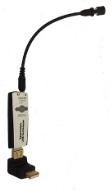
High sensitive noise cancelling Desktop microphone with USB interface and standard 3.5 mm Mic input and output Sound ports in an industry first small USB module, ideal for any Notebook, Ultrabook or Tablet PC, as well as our FlexyMikes and alternative headsets. Dual funcionality: Long-range and variable dictation distance (up to 50 cm or 20") with very high accuracy, under Green LED, and Normal mode for VoIP and Voice recording applications under Blue LED. Industry first integrated 'Speech Equaliser (EQ)' and 'Automatic Gain Control (AGC)' or Amplifier similar to the TableMikes. Single translucent Push Button supporting the long-range (Green LED), normal (Blue LED) and mute (Red LED) modes. Small detachable and interchangeable microphone boom (18 cm or 7”) with flexible tip for perfect positioning. 90º elbow and rigid USB connector. Wideband and 20 kHz High Definition VoIP. Two-year warranty.
Main elements:
The modular SpeechWare USB TravelMike is integrated by:
1. The SpeechMatic USB MultiAdapter with standard 3.5 mm Mic input and output Sound ports, as well as integrated 'Speech Equaliser (EQ)' and 'Amplifier (AGC)' for superior performance with Speech recognition, Voice recording and wideband or 20 kHz High Definition (HD) Voice over IP (VoIP) or Internet telephony
2. The small detachable and interchangeable flexible microphone boom (18 cm or 7") for easier removal, portability and storage
3. The 90° elbow and rigid USB connector, compatible with any Notebook, Ultrabook or Tablet PC.

The built-in EQ & AGC, similar to the award-winning TableMikes, delivers very high recognition accuracy from 10 cm up to 50 cm (4" to 20") range, depending upon voice volume and ambient noise, comparable to that of the best headsets. Unlike conventional microphones, which require keeping always the same dictation distance, as you move away it automatically increases its volume! Optimal dictation distance: about 25 cm or 10" under Green LED.
Most typical uses:
* Long-range and variable dictation distance for best possible Speech recognition (built-in EQ & AGC) with any Notebook, Ultrabook or Tablet PC
* High performance Voice and Music recording with any FlexyMike or alternative headset
* Full duplex (simultaneous Sound in and out) Wideband or High Definition (HD) Voice over IP (VoIP) or Internet telephony
* Full duplex Video conferencing & Podcasting


Recommended accessories:
* Optional USB base or docking station, providing two additional USB ports and universal Flash memory reader (easier transfer of digital recordings for transcription)
* Optional 180º pivoting USB adapter (under development)
* Optional thumb sized, smaller and pivoting microphone boom, ideal for Voice over IP (VoIP) or Internet telephony (under development)
* Optional USB speaker for the USB base (under development)
* SpeechWare FlexyMikes: the lightest and most comfortable microphone headset range in the market to connect into the built-in Sound out port for very noisy environments

Tom Hamilton
Nuance Gold Certified & BBB Accredited
KnowBrainer Speech Recognition Forums http://www.knowbrainer.com/forums/forum
KnowBrainer.com http://www.knowbrainer.com

SpeechWare TableMikes Unboxing and Demonstration

SpeechWare USB TableMikes


The SpeechWare USB TableMike is the collaborative result of several years of the best European design informed with continuous input from numerous experienced speech recognition resellers and users worldwide. Awarded a Best in class "5 Dragons" certification by Nuance, the developer of Dragon NaturallySpeaking. The TableMike was recognised as the Best microphone for speech with "4.5 mice" by the leading American computing magazine MacWorld US. In Europe, the German publication MacWelt also highlighted the excellent accuracy of the TableMike with Dragon Dictate 3, along with the freedom of movement during dictation. The TableMike is ideal for Speech recognition, Voice recording and Voice over IP (VoIP).
The TableMikes feature a unique 'Speech Equaliser (EQ)' and 'Automatic Gain Control (AGC)' or Amplifier, which allows for an unprecedented long and variable range dictation distance (up to 50 cm or 20") with very high accuracy, comparable to the best headsets in the market. As you move away, it automatically increases the volume ("SpeechMatic" technology). Besides its exceptional performance, the SpeechWare USB TableMike comes with many additional features to assist your workflow, thereby increasing your productivity.

Tom Hamilton
Nuance Gold Certified & BBB Accredited
KnowBrainer Speech Recognition Forums http://www.knowbrainer.com/forums/forum
KnowBrainer.com http://www.knowbrainer.com
support@knowbrainer.com